This post has MOVED! It’s new location is here:
The Value of View Through Conversions
Category: Uncategorized
Actionable Takeaways from the Business of Software Conference, Boston 2012
Here are some actionable insights and take-aways from the Business of Software conference (2012, Boston)
Make your Customers Awesome (aka Badass)
 To encourage your customers to spread your product via word-of-mouth, your product should make your customers “badass”. Don’t focus on making your product awesome, focus instead on making your customers awesome. This may seem like a small semantic difference, but what triggers the word-of-mouth snowball is when your customer can impress his/her friends because of something you did.
This is one of the powers of Instagram — it allows average people with no photography skills to start taking awesome pictures that can impress friends and family. Spend some time thinking about what your customers are doing AFTER using your product, because that’s when the word-of-mouth happens.
One exercise to figure out features that can make your customers awesome, is to write a fictional product review WITHOUT mentioning your product or company. Write it solely with a focus on what your product allowed your customer to accomplish.
The Power of Simplicity
+ Scarcity of Cognitive Resources
 Cognitive resources are scarce and are easily depleted. If you present multiple choices to your users early on, they eventually run out of resources at a later date. Simplify the things that are not important and save the complexity only if the task is critical.
For example, a complex registration process can impact the ability of your user to successfully accomplish tasks later on in your workflow (payment?).
Another very interesting item related to this, is that your Willpower resources share the same part of the brain as your Conginitive resources. By depleting cognitive resources, you are also depleting willpower resources. This theoretically means that if you are selling Vices or guilty pleasures, there may be an evil strategy where you hit your customer with complex tasks in order to weaken his willpower in order to then push them into one-click buying a guilty pleasure.
Gamification
Although “gamification” is hot right now, it is generally NOT the type of behaviour you want to encourage. It is a behaviour that triggers similar brain functions to those experienced during slot machine use and is not something that promotes long-term loyalty in your customers. Gamification works only in very narrow verticals and in general will not produce sustainable or desired results.
A/B Testing
 When running an A/B Test, ALWAYS start with a theory and then use the A/B test to try and prove or disprove that theory. Don’t just run random A/B tests that show and hide various elements, hoping to stumble upon a magical winning combination.
To find out if your test results are statistically significant, don’t trust your A/B Tool. Instead use this formula:Don’t trust your A/B testing tool to determine if your test is statistically significant. Instead use the following formula:
- Define N as the total # conversions in A + B
- Define D as the difference in # conversions between A and B divided in half
- The test result is statistically significant if D squared is bigger than N.
Thanks to Jason Cohen at WP Engine for this formula
The Idea Factory:
Nurture Entrepreneurship in your Organization
This is a framework (un-polished and in need of improvement) to nurture entrepreneurship in an organization (mainly geared towards developers, but not necessarily):
- Allow employees to submit an idea for a new product
- Allow employee to work on this “Alpha” version during nights/weekends. No company resources are allocated.
- Every 2-3 months, employees get to demo/pitch their Alpha product (in various stages of completeness)
- If a product is “promoted” to Beta, then the employee becomes CEO for that product and is “fired” from his real job in order to work full time on his product.
- Once the product is “launched”, then the parent company becomes a VC investor in that product and provides funding, resources, etc… (in exchange for ownership)
Company Culture
As an owner, if you don’t “design” your company culture, your employees will do it for you. You shouldn’t let your employees do this, because they usually suck at it.To design your own company culture:
- Decide what you care about
- Hire people that care about the same thing
- Remember the things you care about.
In terms of scaling company culture during rapid growth, “transparency” is a big help. A by product of transparency is that it is very difficult to do stupid things because everyone will call you out on it.
Profit Sharing
Here is the profit sharing strategy that is implemented at Balsamiq.com
- All employees have a base salary that is better than market value
- 10% of all profits are shared with employees
- 25% (of the 10%) is divided equally among all employees
- 75% (of the 10%) is divided based on seniority (with the more senior employees receiving more)
- Additionally, 2% of all profits are divided equally among employees for them to donate to the charity of their choice
Customer Service
Customer service should be like a “par 3” golf course:
- A problem is reported / collected
- The perfect answer is developped
- Customer says thank you
If there are more interactions than this, then you are not spending enough time either understanding the problem or finding the perfect solution for the problem.
How our jobs are killing us
Sitting down for more than 3 hrs a day decreases your lifespan by AT LEAST 2 years on average. Try to stand up and move around for a few minutes at least once every hour, or consider getting a standing desk.
Salesmen and the Art of Selling
Turns out that contrary to popular belief, the best sales people are NOT extroverts. They are NOT introverts either. They are “ambiverts” — which is the majority of us: those that are not on either extreme of the scale.
Interesting Sales Pitches
The Question Pitch: If you ask your customer a question, and you know what answer they will come up with in their head (and it’s a favorable answer), then this is much more compelling than just telling them in the first place. (Should landing page headlines be questions to our customers?)
The Rhyming Pitch: Rhyming messages trigger a cognitive part of the brain that makes them more memorable and seem MORE TRUE. “If the glove doesn’t fit, you must acquit”
The Pixar Pitch: All pixar stories are fundamentally structured like this:
Once upon a time __________________
every day ________________
until _______________
because of that ____________ and because of that _______________
until ___________________
(think of Saving Nemo or any other Pixar movie). Apparently a sales pitch like this is very effective. Should you consider a story like this on your About Us pages? Or perhaps below the fold on your landing pages?
Use Hashtags to Increase the Reach of your Tweets
 If you are like me and don’t have a tone of Twitter followers, make sure you leverage hashtags when tweeting out to maximize the reach of your tweet.
In the post below, notice how I added the #analytics #usability and #ux hashtags. This will increase the chances of having your tweet seen by users following those 3 topics/hashtags, and may get you a couple new followers each time.

The only rule to this is DON’T SPAM
- Limit yourself to MAXIMUM of 3 hash tags (or less).
- Make sure the hashtags are RELAVENT to your post
Everytime I tweet something out, I get a couple of extra followers here and there because of the hashtags I use.
Related:
Lead Generation Forms Suck and I Hate Them
Lately, I’ve been getting a lot tweets with links to supposedly awesome resources. But when I click on these links, I get a big disappointment: A long and overly complicated lead generation form.
Example #1: HubSpot

Clicking on the link brings up the lead generation form below:

Maybe it’s just me, but when someone tells me “Click here to get a list of productivity apps”, then I expect to get a list of productivity apps. NOT a lead generation form. Just give me the content already. Don’t trick me into clicking your link and waste my time by trying to get me to fill out an overly complicated form that I know will result in more marketing coming my way.
There’s nothing wrong with lead collection forms — but set the expectation from the get-go. “What apps do you use to increase productivity? Register to download a free e-book”. That won’t get nearly as many clicks. But at least it’s honest. At least it doesn’t waste my time. At least I know what I’m getting myself into.
FYI, I unfollowed HubSpot after receiving several more of these. And I am now less likely to ever use their products.
What HubSpot did wrong
- They did not set proper expectation in their tweet
- Their lead generation form was overly complex
(12 form elements, 10 of them required) - The newsletter opt-in is confusing: There is a checkbox at the end of the form that reads “I’d like to receive more awesome resources from Duct Tape Marketing!” – Who is Duct Tape Marketing?? I thought this was HubSpot??? (Duct Tape Marketing are actually the producers of the e-book — but that’s not obvious)
- The e-book cover is terrible – If you actually read the cover, you realize it’s just the same words repeated over and over again.
What should HubSpot do to fix it?
- Change their tweet to: “What apps do you use to increase productivity? Register to download a free e-book that have some you may have missed!”
- Reduce the number of form fields in the lead generation form. Ideally, just collect e-mail, ’cause that’s all you really need to deliver the e-book. (Less value as a lead, but less annoying)
Example #2: Optify

Clicking on the link brings up the lead gen form below.
(Also, extra annoyed by the promoted tweet)

Filling out the form gives you this e-mail (with a mediocre document)

So far, nothing unexpected. But then this e-mail:
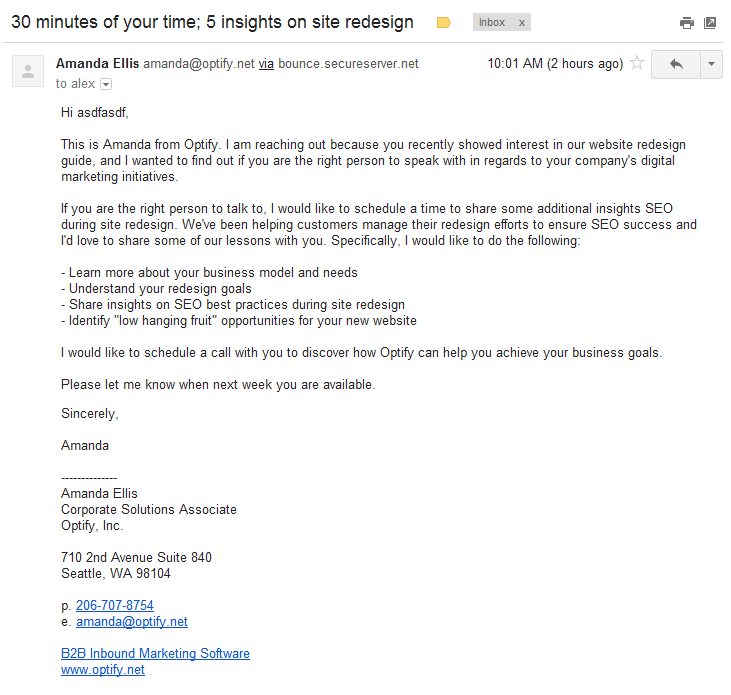
This is clearly an automated e-mail (addressed to asdfasdf), unsolicited (I never opted in to anything), and commercial in nature. Hmmmm… Feels a wee bit spamy. Certainly not what I was expecting for signing up for a crappy e-book.
What Optify did wrong
- They did not set proper expectation in their tweet
- Their lead generation form was overly complex
(Only 7 form elements, but confusing headings like “Business e-mail”) - The e-book content was average at best – Certainly nothing in there compelling enough to make me a customer.
- SPAM! The e-mail in which you send me your content is supposed to be your up-sell opportunity.
What should Optify do to fix it?
- Change their tweet to: “Thinking about website redesign? Register to download this guide: Managing #SEO during a site redesign”
- Reduce the number of form fields in the lead generation form. Ideally, just collect e-mail, ’cause that’s all you really need to deliver the e-book. (Less value as a lead, but less annoying)
- Consider one of the following:
A) Adding a “I would like to hear more about Optify’s digital marketing initiatives” checkbox
B) Include a short solicitation in the first e-mail containing the content
C) Clearly state that “By submitting this form, you are agreeing to receive marketing messages from Optify”
Do you Really Need a Quantity Box?
This post has MOVED! It’s new location is here:
Do you really need a Quantity Box?
Which Social Networks Are Your Visitors Logged Into
This post has MOVED! It’s new location is here:
Which Social Networks are your Visitors Logged Into
PointBlankSEO’s Link Building Strategies: Filter Technical Details
When I attended the LinkLove Boston conference this year, one of the sessions that stuck in my mind was Rhea Drysdale‘s presentation and her Link Building Strategies Spreadsheet (that she based on Jon Cooper‘s great list of almost 200 link building strategies but with added meta data such as time & resources requirements as well as value of links). As soon as I saw the spreadsheet, my initial thought was that “Someone should just create this sort of filtering functionality on the original post — It should be pretty easy to do with jQuery”. Well, when I got back home from the conference I decided to give it a shot over the Easter weekend.
This was the first time I’ve given something significant back to the community, and it felt good. There were some questions on how I technically did this, so here are all the details (I’ve tried unsuccessfully to keep them as non technical as possible ).
Quick Summary
- Technology Used: jQuery + HTML/CSS + Regex + MS-Excel + Set Theory
- Time to Build: 4 hours + 2 hours to integrate with WordPress
- Key Learnings:
- You can produce valuable functionality using only client side code
- Using Excel as a HTML code generator can yield impressive results
- The Excel VLOOKUP function is AWESOME (I can’t believe I never used it before)
- Finally figured out how to lock cell references in excel when copy/pasting formulas (use: $ in front of row/col values – I’ve been searching for this answer for years. Can’t believe it took me so long to figure it out.)
- Developers can use their coding skills for link and relationship building
- LinkLove is a great conference – Highly recommended
- Hustle: Important to be timely with your creations
The Problem
When I undertook this project I had a few self imposed restrictions:
- Must work & run on PointBlankSEO.com. This means that it must run using the existing infrastructure (WordPress)
- Must be easy to install. I assumed that Jon knew nothing about coding and so ideally I would just send him a text file with instructions to “copy and paste this into your post”
- Must have stakeholder buy-in. This meant that both Rhea from Outspoken Media and Jon from PointBlankSEO.com would need to see this as valuable (And I certainly did not want to step on any toes).
The Solution
Database and server side code seemed out of the question –100% client side code seemed like the obvious answer. Since all the content I needed was already on the page in HTML, it would just be a matter to Hide/Show the “Strategies’ depending on the filter criteria.
There would be 3 different filters: One for Link Value, One for Resource Dependencies, and one for Time Required to Implement.
Step 1: Create the Filtering Form
This was easy enough. A simple HTML
No submit button was required as I would enable jQuery events on each click of a checkbox or change of the drop down:
Step 2: Create the Filters to Show/Hide the “Strategies”
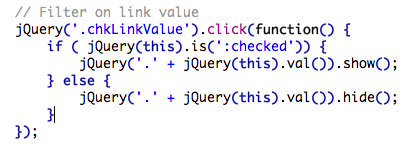
Link Value Filter
This seemed like the easiest one to implement. All I needed was to have each strategy wrapped in a DIV tag that had a CLASS of “High”, “Moderate”, or “Low”, etc… When someone would click on a checkbox, I would use jQuery to just Show or Hide all DIVs with that specific class. Easy.
The HTML:

jQuery Code
Dependencies Filter
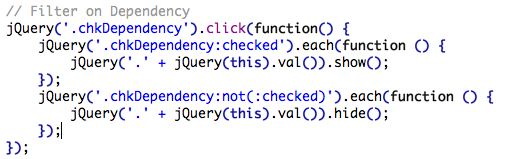
This also didn’t seem too complicated. I would create another DIV tag wrapper and I would set multiple classes (one for each dependency) and would turn the div on/off depending on if it had a CLASS named with that dependency. In order to avoid weird situations where an item is shown when it should not, I first SHOW all tactics with selected dependencies and then HIDE all tactics with dependencies that are NOT selected
The HTML

The jQuery
Time to Execute Filter
This filter confused me at first, but I finally figured it out. I wanted it to work a little differently than in Rhea’s spreadsheet. ie: If you say you have 8 weeks to complete your strategy, then you want to display all tactics that take LESS THAN 8 weeks (as opposed to all tactics that take EXACTLY 8 weeks).
I did this by wrapping each tactic with another div tag with a multiple classes, one for each possible week value that this tactic should be visible for. e.g.: For a tactic that takes 4-8 weeks to implement I would include the following classes: 4weeks, 6weeks, 8weeks, 12weeks, and moreweeks. This means that this div would be visible if the time period available to execute was 4,6,8,12, or more weeks.
In order to make sure that everything was properly in sync, the logic involved first hiding ALL time ranges, and then showing the tactics what were marked as valid for the currently selected time frame.
The example HTML:

And the jQuery to filter on this:

All Three Filters in Action
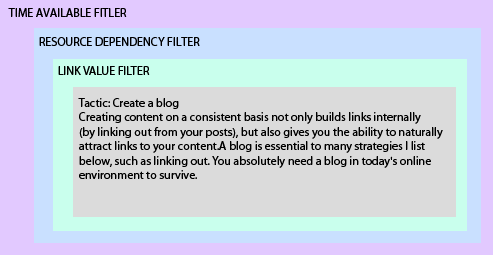
The combined HTML code for each item, wrapped in the 3 filter DIVs, looks something like this:
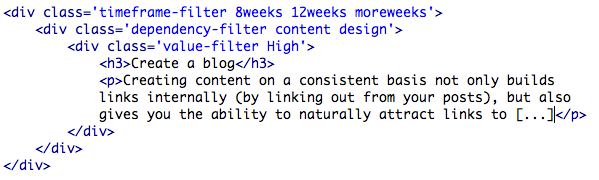
These three filters were AND filters, meaning that an Item must match ALL the filter criteria in order to be visible. Although you could do this sort of thing in code I decided to take the simpler approach and to just use individual nested DIV tags for each filter.
Step 3: Generate the code
Now I knew exactly how to filter the original post with jQuery. One problem however: Jon’s post wasn’t formatted anything like I needed it to be. Additionally, Jon’s post didn’t have any of the additional details related to Time, Dependencies, and Link Value that were included in Rhea’s spreadsheet.
I decided that I would use Rhea’s spreadsheet to generate a duplicate of Jon’s post, but with the HTML formatting that I needed. Visually, it would look almost identical to the original, but under the hood I would have all my filtering DIV tags properly nested. This would have been a lot easier if Rhea’s spreadsheet had all of Jon’s Tactic Descriptions, but it didn’t.
Import Descriptions from PointBlankSEO.com into Rhea’s Spreadsheet
Option 1: I first considered doing it manually but quickly dismissed that thought: There are about 200 items in the original post AND Rhea’s spreadsheet doesn’t have the items listed in the same order as Jon has in his post.
Option 2: Use Regex and Excel to do the heavy lifting for me
Download the HTML source code from the original post

Use Regex Search & Replace to strip out all the junk that I wasn’t interested in, and leave only the “Tactic” heading and description separated by a custom character (in my case a “pipe” character: |):

I then copy/pasted this into excel and did a “Text to Columns” in order to have 1 column with the tactic title and the second column with the HTML description:

I then used the awesome excel function VLOOKUP to matchup each of Rhea’s tactic titles with the titles this new sheet and import the description into the original spreadsheet. (I also used VLOOKUP to simplify some of my HTML Class Name generation)
=VLOOKUP(C3,Sheet7!$A$1:$B$248,2,FALSE)
Now I just needed to create a new column on the original spreadsheet and create a formula that would generate me the HTML that I needed. Here is the formula I used:
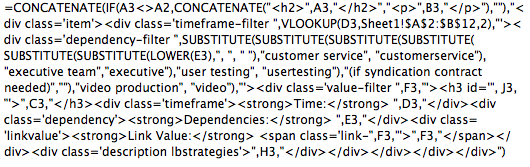
This produces an output of this:
Create an RSS feed
Time: 1-2 weeks
Dependencies: Design, development
Link Value: High
If your blog is run on any of the popular Content Management Systems, you’ll already have an RSS feed. If you don’t, create one. If you do, burn it at Feedburner.com so you can get statistics on your subscribers.
For link building, it’s simple. There are sites out there that will scrape your content (stealing it without permission). When they do, make sure you get a link back by 1) including links to other pages on your site in your posts and 2) installing the RSS footer plugin for WordPress (adds a link to your blog after every post).
Step 4: Get WordPress to Play Nice
Now, theoretically, it was just a matter to select all cells in this column, and copy paste them into an HTML document, test it locally, add my jQuery filtering code, and send it off to Jon! That worked fine locally on my machine, but once we tried to get this working on WordPress I ran into some issues. In the end (and to make a long story short) we ended up installing the WordPress Raw HTML plugin and everything started to work more-or-less well.
Step 5: Send it off to the Stakeholders and hope they like it!
Turns out this was the least of my worries. Both Rhea and Jon loved it, and it actually turned into a pretty cool story of how the SEO community “open sourced” the original blog post to build on and create something better:


If you haven’t already checked them out:
Add Color Swatches to your Shopify Collections Page
This page has MOVED! It is now located here:
Add Color Swatches to your Shopify Collections Page
 Alex Czartoryski